

Most architecture, design-build, and construction firms don’t struggle because they lack software. They struggle because they depend on 5 to 10 disconnected tools, sometimes more. These include BuilderTrend or Procore for projects, QuickBooks or Sage for accounting, monday.com | Outpace everyone with the best AI work platform or Clockify for scheduling, and Revit or ArchiCAD for design files. They also rely on spreadsheets, PDFs, and emails stored in different places.
Construction data silos happen when these tools operate independently. This makes project data inaccessible, duplicated, or unreliable.
This fragmentation leads to the same numbers being re-entered across BuilderTrend, Excel, and QuickBooks. It also causes project managers to lose real-time visibility into costs and schedules. Accounting ends up chasing documents. Leadership struggles to trust profitability or cash-flow reporting.
Even simple questions become hard to answer:
- Why don’t BuilderTrend and QuickBooks match?
- Where is the latest contract or drawing?
- How do we get one consistent report?
This article breaks down why these silos form long before any data strategy is in place. It also explains how they quietly slow down operations across the business.
Key Takeaways
- Construction data silos slow reporting, create errors, and increase rework.
- Integrating tools centralizes project, financial, and field data.
- Connected systems save time, reduce admin labor, and improve profitability.
- Unified data builds compliance confidence (ISO 19650, audit trails).
- A connected software stack unlocks real-time construction analytics.
What Happens When Construction Software Doesn’t Connect?
When construction software does not connect, each team works from its own version of the truth. Project data becomes fragmented across BuilderTrend, Procore, QuickBooks, Sage, Revit, ArchiCAD, Excel sheets, PDFs, and email attachments. This causes inconsistent information, duplicate entries, lost updates, slow workflows, and an inability to get accurate project or financial visibility in one place.
The Data Disconnect Problem
Most construction and design–build firms rely on a mix of tools that don’t communicate. Project teams use BuilderTrend or Procore, accounting runs QuickBooks or Sage, designers work in Revit or ArchiCAD, and schedulers use monday.com | Outpace everyone with the best AI work platform or Clockify. Field updates are often stuck in PDFs, Excel sheets, or emailed photos.
Each tool solves a specific need, but none share a common data model. Budgets updated in BuilderTrend may differ from QuickBooks. Revised drawings might not reach the field. Material quantities can change in spreadsheets without procurement knowing.
The result is inconsistent information, trapped updates, and slow workflows. Common pain points include outdated bills of quantity, mismatched schedules and financials, double entry between systems, and conflicting reports.
Even basic questions become difficult to answer:
- What is the current project cost?
- Is the team ahead or behind schedule?
- Which change order is approved?
- Which invoice is the latest version?
Data exists, but it is scattered across too many systems to use confidently.
The Business Impact of Fragmented Systems
Disconnected systems don’t just slow teams down. They create real financial loss. Poor or inconsistent data drives 14 percent of all global construction rework and contributed to an estimated 1.8 trillion dollars in industry losses in 2020. Most of this comes from duplicated work, inaccurate reports, missing files, and decisions based on outdated information.
Many firms spend 35 to 45 percent of labor hours on non-optimal activities like re-entering data, reconciling numbers, or hunting for documents. These tasks add cost but no value. Even small inefficiencies compound quickly. A 10 percent operational drag can reduce overall profit by 5 percent, especially for companies managing multiple projects at once.
Without unified data, leaders cannot confidently see estimates versus actuals, true profitability, or emerging risks. They spend more time gathering information than acting on it. As the organization takes on more jobs, the problem only scales. More spreadsheets, more manual entry, and more misaligned systems.
In Summary:
- Fragmented tools cause inconsistent, lost, or duplicated data.
- Teams spend excessive time reconciling numbers and documents.
- Real-time project and financial visibility is limited.
- Operational inefficiencies and errors directly affect costs and timelines.
Common Construction Software Ecosystem (and Why It’s Fragmented)
Most construction firms rely on multiple specialized tools that do not integrate seamlessly. This fragmentation creates data silos, slows workflows, and makes it difficult to get a clear, unified view of projects, finances, and documentation. Without integration, teams spend hours reconciling information, duplicating work, and chasing updates instead of making strategic decisions.

The Core Systems Most Firms Rely On
Construction teams typically use a mix of software for specific functions:
| System Type | Example Tools | Key Challenges / Disconnects |
| Project Management | BuilderTrend, Procore, monday.com | Outpace everyone with the best AI work platform | No standard application programming interfaces (APIs); siloed workflows |
| Design & Architecture | Revit, ArchiCAD, BIM Cloud | Format incompatibility; separate data models |
| Finance | QuickBooks, Sage | Manual entry; delays in reporting |
| Documents | PDFs, Excel, OCR tools | Hard to unify; error-prone |
Each tool solves a particular problem but doesn’t share a central database. This means:
- Budgets may differ from project schedules.
- Updated designs may not reach the field.
- Financial reports can lag by days or weeks.
- Important documents like contracts, RFIs, or compliance forms remain trapped in spreadsheets or PDFs.
Teams end up manually reconciling data or working from outdated information, increasing the risk of errors and delays.
Why These Tools Don’t “Talk” to Each Other
Several factors prevent seamless integration:
- No standard APIs or data formats: Each vendor stores data differently, making automatic syncing difficult.
- Vendor lock-in: Some systems restrict access to protect their ecosystem, limiting interoperability.
- Format differences: BIM files, accounting records, and project logs all use unique structures.
- Manual workarounds: Teams rely on CSV exports, double entry, or secondary tools like Bluebeam for markup and tracking.
- Spreadsheets as a crutch: Excel is flexible and familiar, but it cannot scale or serve as a single source of truth.
Fragmentation exists because these tools were designed for specific tasks, not for cross-system integration. Without a centralized system, data remains scattered, updates get duplicated, and teams cannot make informed decisions quickly.
In Summary:
- Most firms rely on multiple specialized tools for project management, design, finance, and documents.
- Tools lack standard APIs and use incompatible formats, creating silos.
- Manual workarounds and spreadsheets increase errors and slow workflows.
- Fragmentation prevents a unified view of projects, finances, and compliance data.
How Construction Software Integration Solutions Work
Construction software integration solutions connect your disconnected tools, so data flows automatically between them. This centralizes project updates, financials, and documents into one reliable system. Integration reduces manual re-entry, prevents lost or duplicated data, and creates a single source of truth that helps teams make faster, more confident decisions.
The Building Blocks of Integration
Integration works through a combination of technical components:
- Connectors and Middleware: These bridge tools like BuilderTrend, Procore, QuickBooks, and Revit, enabling them to share data. Without connectors, each tool would remain a silo, requiring manual reconciliation.
- ETL/ELT Pipelines: Short for Extract, Transform, Load (or Load, then Transform), these pipelines move data between systems, clean it, and standardize it. This ensures that project, financial, and design information is accurate and usable.
- Unified Data Model: Once data is centralized and standardized, it can feed dashboards and analytics in real time, giving leadership clear insight into project performance, budgets, and cash flow.
These building blocks work together to ensure that your data isn’t trapped in multiple systems or files, making reporting and decision-making much simpler.
Practical Example – BuilderTrend ↔ QuickBooks Sync
Even basic tasks become smoother when tools communicate:
| Before Integration | After Integration |
| Project updates manually entered multiple times | Budgets, invoices, and change orders auto-sync |
| Accounts receivable and payable delayed by mismatched data | Real-time financial visibility across teams |
| Different cost codes in BuilderTrend vs QuickBooks | Standardized cost codes across all systems |
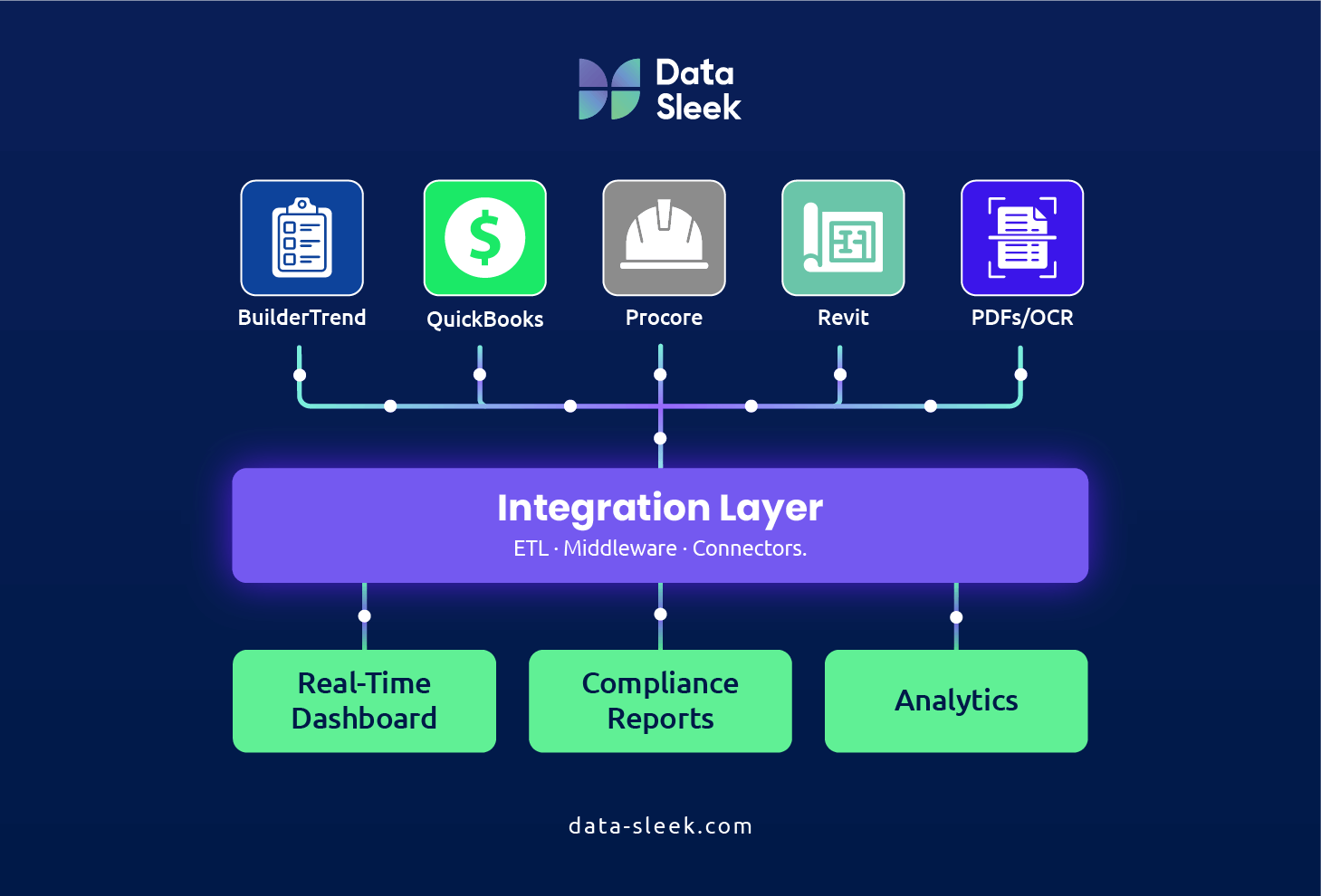
With integration, repetitive work disappears, data errors drop, and project and finance teams can trust that they’re always working from the same, accurate information.
Adding OCR and Automation to the Mix
Integration can go further by automating data extraction from documents:
- PDFs, Excel sheets, and scanned contracts become structured, usable data.
- Automation extracts invoices, change orders, and compliance documents without manual effort.
- Teams spend less time reconciling or hunting for files and more time on high-value tasks like decision-making, project oversight, and profitability analysis.
These tools not only connect your software but also unlock the hidden value in documents that previously required tedious manual work.
In Summary:
- Integration connects disconnected tools through connectors, middleware, and ETL/ELT pipelines.
- Data flows automatically, reducing manual re-entry and errors.
- Optical character recognition (OCR) and automation extract structured data from documents for faster analytics.
- Teams gain a single source of truth, enabling confident, faster decisions.
Benefits of Unified Construction Data Analytics
Connecting project management, design, and accounting tools centralizes all construction data. This reduces errors, prevents duplicated work, improves collaboration, and delivers actionable insights for faster, smarter decision-making. Ultimately, unified data boosts productivity, cuts costs, and supports profitable growth across projects, teams, and business units.

Turning Data into Real-Time Insights
Integration transforms fragmented information into dashboards and reports that are immediately actionable:
- Job performance at a glance: Track costs, schedule status, and cash flow across all projects in a single view.
- Estimate vs actual: Instantly see how projected budgets compare to real spending, enabling quick adjustments before issues escalate.
- Compliance and audits: Generate accurate reports in minutes instead of hours, without hunting through PDFs, emails, or spreadsheets.
By unifying data, firms gain visibility that allows faster, more informed decisions and reduces costly delays or mistakes.
Breaking Down Silos and Boosting Collaboration
With all teams working from the same data:
- Executives, project managers, and accounting staff access consistent information, avoiding miscommunication.
- Version conflicts on drawings, budgets, or contracts are eliminated, ensuring everyone is on the latest update.
- Misunderstandings, duplicated effort, and delays decrease because all stakeholders can see project progress in real time.
Integration ensures every team works together efficiently, improving accountability and overall project execution.
The ROI of Connected Systems
Unified data delivers measurable business results:
- Productivity gains: McKinsey reports that companies with integrated systems see 15–20% higher productivity by eliminating manual work and redundant processes.
- Less rework: Fewer duplicated tasks translate to faster project delivery and higher profit margins.
- Faster reporting: Leaders can make timely, data-driven decisions with confidence.
- Scalable operations: Centralized, reliable data supports growth without adding operational complexity.
Integration is more than a technology upgrade. It is a direct driver of efficiency, profitability, and sustainable business growth.
In Summary:
- Centralized data provides actionable insights and real-time dashboards.
- Collaboration improves as all teams work from consistent information.
- Productivity increases and rework decreases, saving time and costs.
- Scalable operations and faster reporting support profitable growth.
Conclusion: Future of Connected Construction Software
The future of construction software lies in connecting tools and centralizing data so firms can reduce rework, avoid hidden costs, and gain real-time insights across projects.
Fragmented systems create inefficiency, lost information, and delayed decision-making. When project management, design, accounting, and document tools are connected, teams can collaborate more effectively, track progress and profitability in real time, and make informed decisions that drive growth.
Most importantly, connected systems give leadership a clear view of operations, reduce manual re-entry, and make compliance and reporting simpler. For architecture, design–build, and construction firms, adopting integration solutions is no longer optional. It is key to operational efficiency and competitive advantage.
Want to understand how connected construction data can simplify your projects? Book a free consultation with our experts to explore the possibilities.
Frequently Asked Questions (FAQ)
Why do construction software tools often fail to connect?
Construction software tools often fail to connect because they use different data formats, lack standardized APIs, and are designed to operate independently rather than as part of an integrated ecosystem.
Most project management, accounting, and design platforms were developed for specific functions without considering interoperability. Tools like BuilderTrend, QuickBooks, and Revit store data in proprietary formats, forcing teams to rely on manual exports and re-entry. This creates errors, slows workflows, and is common across architecture, design–build, and construction firms using multiple tools daily.
What is causing data to get lost between BuilderTrend, QuickBooks, and other tools?
Data gets lost between tools due to incompatible formats, duplicated entries, human error, and the absence of a centralized system to manage and verify information.
When updates from BuilderTrend are manually entered into QuickBooks, discrepancies can arise. Additional fragmentation comes from Excel spreadsheets, PDFs, and email threads, which create blind spots in project visibility. Over time, these gaps reduce accuracy, delay decisions, and impact profitability and operational efficiency.
How do disconnected tools affect project visibility and reporting?
Disconnected tools make it difficult to get real-time, accurate insights across projects, leading to delayed or incomplete reporting.
Project managers and leadership must reconcile data from multiple sources, which limits their ability to track progress, costs, and performance in a single view. Without this visibility, risks may go unnoticed, forecasts are less accurate, and decision-making for scheduling, budgeting, and resource allocation is hindered, impacting both operations and client satisfaction.
Why is manual data entry still so common in construction firms?
Manual data entry persists because many construction tools do not integrate seamlessly, and teams are forced to transfer information by hand to keep systems aligned.
Even with multiple software platforms, differences in formats, fields, and processes often prevent automation. Teams continue to rely on Excel, PDFs, and repeated entry, which increases errors, consumes valuable time, and keeps manual processes as the default workaround for disconnected systems.
What are data silos and why do they happen in construction?
Data silos are isolated pockets of information that cannot easily be shared between systems or teams, and they happen because software platforms are designed to operate independently.
Silos form between project management, accounting, and design tools, creating inefficiency and miscommunication. For example, progress updates in BuilderTrend may not reach finance teams in QuickBooks in real time, making it harder to see full project performance and increasing the risk of cost overruns.
How do multiple project management, design, and accounting tools create inefficiency?
Using multiple tools for different functions creates inefficiency because teams spend excessive time transferring data, reconciling inconsistencies, and managing documents manually.
When systems don’t communicate, work is duplicated and error-prone processes persist. Excel budgets, PDF contracts, and emails act as temporary bridges, slowing decisions, reducing productivity, and increasing the likelihood of mistakes while hiding potential cost savings or scheduling improvements.
What risks does fragmented construction data pose to profitability and compliance?
Fragmented data increases the risk of financial loss, operational inefficiency, and regulatory non-compliance because information is incomplete, inconsistent, or delayed.
Lost or inaccurate data leads to budget overruns, missed deadlines, and rework, while audit or compliance reporting becomes difficult and risky. Without a unified source of truth, firms struggle to track project profitability, forecast costs, and make informed strategic decisions.
Glossary
API
Application Programming Interface. A set of rules that allows different software systems to communicate and share data seamlessly.
Data Integration
Combining data from different sources into a unified system. This ensures information is accurate, accessible, and actionable across teams.
Data Silo
Isolated information that cannot be easily shared across systems. Silos prevent teams from accessing complete data and reduce operational efficiency.
Data Warehouse
Centralized storage for structured and integrated data from multiple systems. It enables analysis, reporting, and informed decision-making.
ETL/ELT
Extract, Transform, Load / Extract, Load, Transform. Processes that move data from multiple sources into a central system for analysis and reporting.
OCR
Optical Character Recognition. Technology that converts text from scanned documents or PDFs into machine-readable data.
Single Source of Truth (SSOT)
One centralized system providing consistent, reliable data. It eliminates confusion by making sure everyone works from the same information.