
If you’re reading this, there’s a good chance your current inventory system is held together with duct tape and good intentions. Maybe it’s a spreadsheet that worked fine when you had 200 products but now crashes when two people edit it at the same time. Maybe it’s a database that someone set up years ago and nobody really understands anymore. Or maybe you’re using inventory software that won’t let you pull your own data out when you need a report that isn’t on the menu.
You’re not alone. The inventory management software market is worth nearly $3 billion in 2026, and a huge portion of that growth is coming from businesses making the jump from manual processes to real database-backed systems. The common thread? They all hit a wall where their old approach simply couldn’t keep up.
This guide is written from the perspective of a database architect—not a software sales pitch. We’ll walk through the real questions you should be asking, compare the most common database options honestly, and help you figure out whether to build a custom solution, go open-source, or buy commercial software. Because the database sitting underneath your inventory system is what determines whether it stays reliable as your business grows or becomes the bottleneck that holds you back.
Why Your Database Choice Makes or Breaks Inventory Management
Every inventory management system, whether it’s a $50,000 enterprise platform or a homegrown app, relies on a database to store and retrieve data. That database handles every stock update, every sale, every purchase order, every warehouse transfer. When it works well, nobody notices. When it doesn’t, the problems show up fast: stock counts that don’t match reality, reports that take minutes to load, orders that oversell products you don’t have.

The challenge is that businesses rarely think about the database layer until something breaks. They choose inventory software based on features and price, not realizing that the database underneath determines how fast it runs, how well it scales, and—critically—how easily you can get your data out when you need it for reporting, analytics, or a future migration.
The database is the foundation. You can change the paint on the walls later, but you can’t easily swap the foundation once the building is up.
Whether you’re evaluating databases for a custom system or trying to understand what’s running under the hood of the software you’re considering, the principles are the same. Let’s start with the questions you should be asking before you look at any specific technology. For a deeper look at database architecture principles for inventory, see our guide on building a scalable inventory management database architecture.
Key Factors to Evaluate Before Choosing a Database
Before comparing PostgreSQL to MySQL or debating SQL vs. NoSQL, take a step back. The right database depends entirely on your specific situation. Here are the questions that actually matter.
How Large Is Your Inventory?
Size matters more than most people realize, but not in the way you might think. A business with 300 SKUs and one warehouse has fundamentally different database needs than one with 50,000 SKUs across five locations.
- Under 500 SKUs, single location: Almost any database will work. At this scale, even a well-maintained spreadsheet can get by for a while. If you’re building something new, a simple MySQL or SQLite setup is more than enough.
- 500 to 50,000 SKUs, multiple locations: This is where database choice starts to matter. You need solid transaction handling, good indexing for fast lookups, and a system that won’t slow down when two warehouses update stock at the same time. PostgreSQL or MySQL with proper schema design handles this range well.
- 50,000+ SKUs or high transaction volume: You’re in territory where database architecture becomes a real discipline. Partitioning, replication, caching layers, and potentially separating your transactional database from your analytics workloads. This is where professional architecture guidance pays for itself quickly.
Build Your Own, Go Open-Source, or Buy Commercial Software?
This is the biggest decision you’ll make, and it affects everything that follows. Each path has trade-offs that go beyond the sticker price.
Commercial software (Fishbowl, Cin7, Zoho Inventory, NetSuite) gives you a working system out of the box. You get support, updates, and integration with common business tools. The downside? You’re locked into their way of doing things. Many commercial platforms use proprietary databases or restrict direct database access, which means you can’t easily write custom reports, extract data for analytics, or migrate to something else down the road. Some vendors make it intentionally difficult to get your own data out—that’s not a bug, it’s their retention strategy.
Open-source platforms (Odoo, ERPNext, InvenTree) give you full access to the underlying database and codebase. Odoo runs on PostgreSQL, ERPNext on MySQL MariaDB, InvenTree supports PostgreSQL, MySQL, or SQLite. You can query the database directly, build custom reports, pipe data into a warehouse, or modify the application itself. The trade-off is that you’ll need technical resources to set it up, maintain it, and customize it. But you own your data completely, and you’re never held hostage by a vendor’s export limitations.
Custom-built systems give you maximum control. You choose the database, design the schema, and build exactly what your business needs—nothing more, nothing less. This makes sense when your inventory processes are complex, industry-specific, or need tight integration with systems that commercial tools don’t support. The investment is higher upfront, but you avoid the ongoing compromises that come with fitting your business into someone else’s software.
Ask vendors this question before signing: “Can I run SQL queries directly against my data? Can I export everything, including transaction history, at any time? Do you provide an API to your system to access data?” If the answer is no or vague, think carefully about whether that’s a trade-off you’re willing to make.
Do You Need Real-Time Analytics?
There’s a difference between checking stock levels (which every system does) and analyzing inventory performance in real time—trending which products move fastest, spotting reorder patterns, forecasting demand, or tracking shrinkage across locations.
For basic inventory tracking, your operational database handles it fine. But when you start asking analytical questions—things like “show me the 90-day sales velocity for every SKU by location” or “which suppliers have the longest lead times relative to our stockout rate”—you’re putting a different kind of workload on the database. Running heavy analytical queries against the same database that’s processing live transactions can slow everything down.
That’s when a separate analytics layer becomes valuable. Tools like Snowflake, Singlestore, BigQuery, or Redshift let you replicate your inventory data into a purpose-built analytics environment where you can run complex queries without affecting your operational system. It’s an additional investment, but for businesses where data-driven inventory decisions translate directly to margin improvement, the ROI is significant. We cover this approach in our data warehouse consulting services.
Will You Need Barcode or RFID Scanning?
If you’re scanning items in a warehouse, your database needs to handle high-frequency writes with low latency. Every scan is a database write, and in a busy warehouse, that can mean hundreds or thousands of writes per minute. The database needs to confirm each write quickly enough that the scanner operator isn’t waiting around.
Most modern relational databases handle this fine with proper indexing. But it’s worth testing under realistic load before you go live. The integration between scanning hardware, middleware, and database is a common source of performance issues that only show up under real-world conditions.
What’s Your Integration Landscape?
Your inventory database doesn’t exist in isolation. It needs to talk to your ERP, your ecommerce platform, your accounting software, your POS system, and potentially your suppliers’ systems. The more integrations you need, the more important it is that your database supports standard protocols and has good API accessibility.
This is another area where the commercial vs. open-source vs. custom decision matters. Commercial platforms typically offer pre-built integrations with popular tools but may struggle with anything outside their ecosystem. Open-source and custom solutions give you full control over integrations but require development work. A well-designed data architecture ensures all these systems share data reliably without creating silos.
Comparing the Best Databases for Inventory Management
Now that you’ve thought through your requirements, let’s compare the most common database options. This isn’t a generic listicle—it’s an honest assessment based on years of architecting database solutions for businesses of all sizes.
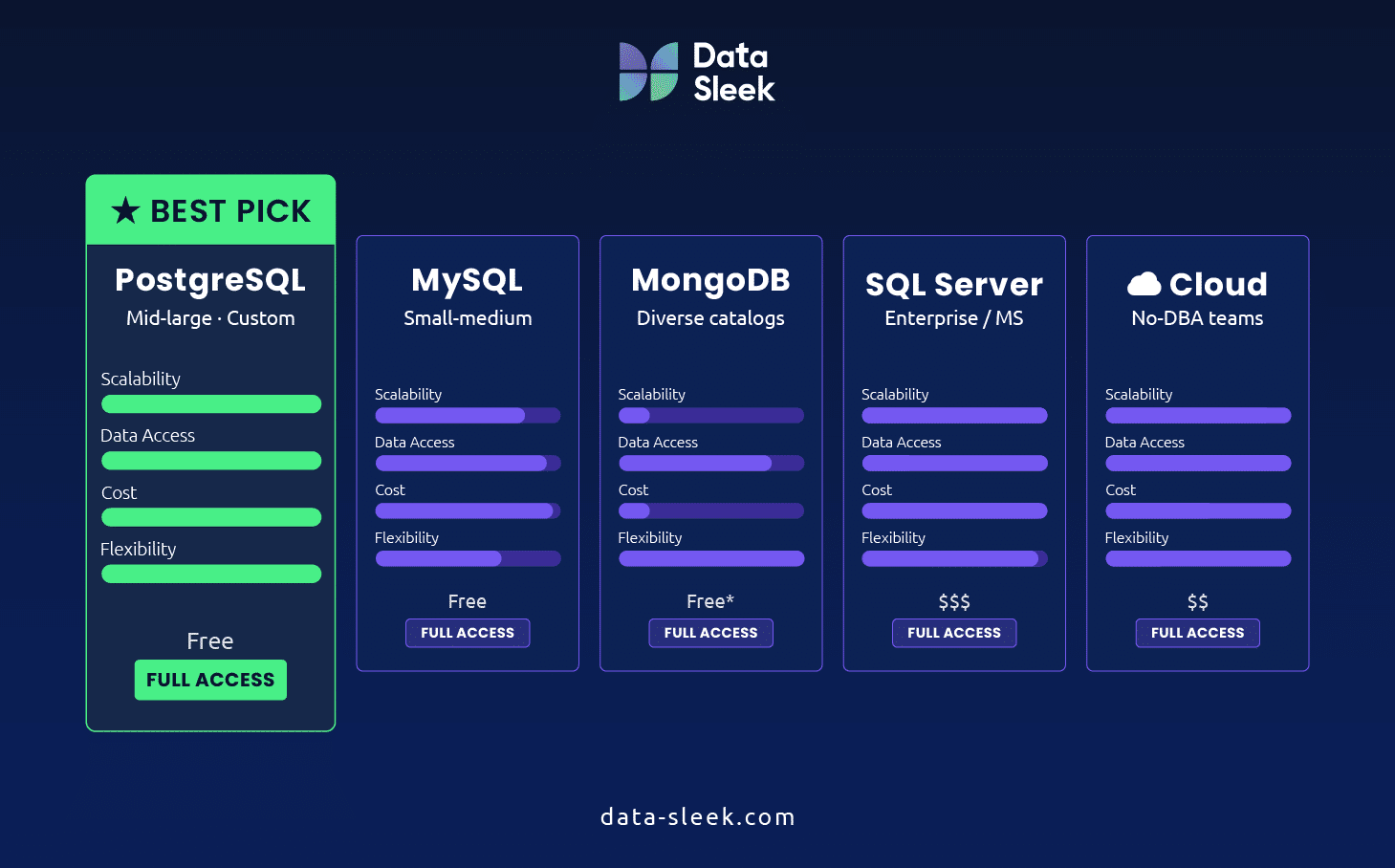
PostgreSQL — The Best All-Around Choice
If we had to recommend one database for most inventory management use cases, it would be PostgreSQL. It’s open-source, incredibly mature, and handles both structured inventory data and flexible product attributes in a single system.
What makes PostgreSQL stand out for inventory is its JSONB support. You can store standard relational data (SKUs, quantities, locations, transactions) in structured tables while using JSONB columns for product attributes that vary by category. A t-shirt needs size and color; a laptop needs processor, RAM, and screen size. PostgreSQL lets you handle both without awkward workarounds.
- Best for: Mid-to-large businesses, custom-built systems, open-source platforms (Odoo, InvenTree)
- Strengths: ACID compliance, JSONB flexibility, powerful indexing, huge community, cost-free
- Watch out for: Slightly steeper learning curve than MySQL. Requires tuning for very high write workloads
MySQL — Simple, Proven, Widely Supported
MySQL is the most widely deployed open-source database in the world, and for good reason. It’s straightforward to set up, well-documented, and supported by virtually every hosting provider and inventory software platform.
For small-to-medium inventory operations, MySQL is often the path of least resistance. Many commercial inventory tools (including Fishbowl) use MySQL under the hood, and finding developers who know MySQL is easy and relatively affordable.
- Best for: Small-to-medium businesses, teams with limited database expertise, quick deployments
- Strengths: Simplicity, massive ecosystem, cost-effective, easy to find talent
- Watch out for: Less flexible than PostgreSQL for complex data types. Replication setup can be tricky at scale
MongoDB — When Product Variety Is Extreme
MongoDB is a NoSQL database that stores data as flexible JSON-like documents rather than in rigid tables. It shines when your product catalog has wildly different attributes across categories and you don’t want to force everything into a fixed schema.
That said, for core inventory operations—tracking stock levels, processing transactions, maintaining accuracy across locations—relational databases generally provide stronger guarantees. MongoDB’s eventual consistency model can be a liability when you need to know, with certainty, that a product is in stock before confirming a sale. We typically see MongoDB used alongside a relational database: MongoDB for the product catalog, PostgreSQL or MySQL for the transactional inventory layer.
- Best for: Ecommerce with highly diverse product catalogs, rapid prototyping
- Strengths: Flexible schema, fast reads for product lookups, good for catalog-heavy applications
- Watch out for: Weaker transactional guarantees, potential for data inconsistency in multi-location inventory
SQL Server — The Enterprise and Microsoft Ecosystem Choice
If your organization already runs on Microsoft tools—Azure, .NET applications, Power BI for reporting—SQL Server is a natural fit for inventory management. It offers strong performance, built-in reporting through SSRS, and tight integration with the broader Microsoft stack.
SQL Server is common in manufacturing and distribution, where businesses often run ERP systems that already depend on it. The licensing costs are higher than open-source options, but if you’re already paying for the Microsoft ecosystem, the incremental cost may be justified by the seamless integration.
- Best for: Enterprise organizations, Microsoft-centric environments, manufacturing/distribution
- Strengths: Strong performance, built-in reporting, excellent tooling, enterprise support
- Watch out for: Licensing costs, vendor lock-in, overkill for small operations
Cloud-Native Databases — Managed Infrastructure, Less Overhead
Amazon RDS, Google Cloud SQL, and Azure SQL Database aren’t new database engines—they’re managed versions of the databases above. Amazon RDS can run PostgreSQL or MySQL for you; Azure SQL Database is managed SQL Server. The database itself is the same. What changes is who manages the infrastructure.
For businesses without a dedicated database administrator, managed cloud databases can save significant time and headaches. Backups happen automatically, scaling is handled through configuration rather than hardware, and high availability is built in. The trade-off is higher per-unit cost compared to self-managed databases, and some loss of low-level control.
- Best for: Businesses without dedicated DBAs, SaaS-based operations, distributed teams
- Strengths: Automatic backups, easy scaling, high availability, no server management
- Watch out for: Higher ongoing costs, potential for unexpected billing spikes, less control over configuration
Quick Comparison
| Database | Best For | Inventory SW | Scalability | Cost | Data Access |
| PostgreSQL | Mid-large, custom & open-source | Odoo, InvenTree | Excellent | Free | Full |
| MySQL | Small-medium, broad support | Fishbowl, many SaaS | Excellent | Free | Full |
| MongoDB | Diverse catalogs, ecommerce | Custom builds | Good | Free* | Full |
| SQL Server | Enterprise, Microsoft stack | Many ERPs | Excellent | $$-$$$ | Full |
| Cloud Managed | No-DBA teams, SaaS ops | Varies | Excellent | $$ | Full |
| Proprietary (vendor) | Bundled with commercial SW | Cin7, Zoho, NetSuite | Vendor-dependent | $$-$$$ | Limited |
* MongoDB Community Edition is free. MongoDB Atlas (managed) has usage-based pricing.
What Databases Power Popular Inventory Software?
If you’re leaning toward commercial or open-source inventory software rather than building custom, it’s worth knowing what’s running under the hood. The database powering your software determines what happens when you need to extract data, run custom reports, or eventually migrate.
Commercial Platforms
- Fishbowl: Runs on MySQL (historically Firebird). You can access the database directly with SQL queries, which is relatively unusual for commercial inventory software and a significant plus for reporting flexibility.
- NetSuite: Built on Oracle. Powerful but deeply proprietary. Getting data out typically means going through NetSuite’s own reporting tools or their SuiteAnalytics API. Direct database access isn’t available.
- Cin7: Cloud-based with a proprietary data layer. Data access is through their API, which is functional but means you’re always going through their interface to reach your own data.
- Zoho Inventory: Part of the Zoho ecosystem, cloud-based. Good API access and integrates well with Zoho’s other tools, but you can’t query the underlying database directly.
Open-Source Platforms
- Odoo: PostgreSQL. Full database access, well-documented schema. You can run SQL queries, build custom reports, or replicate data to an analytics warehouse without any restrictions.
- ERPNext: MariaDB (MySQL-compatible). Same story—full database access, open schema documentation, complete data ownership.
- InvenTree: Supports PostgreSQL, MySQL, or SQLite. Lightweight, designed specifically for inventory and parts management. Full database access and a clean API.
The pattern is clear: open-source platforms give you full access to your data. Commercial platforms range from generous (Fishbowl) to restrictive (NetSuite, Cin7). This matters more than most buyers realize—especially when your business grows and your reporting needs outpace what the platform offers out of the box.
When You Need More Than a Database: Adding an Analytics Layer
Most businesses start with their inventory database doing double duty: handling operational transactions and running reports. That works fine at small scale. But as your data grows and your questions get more complex, running analytical queries against your production database starts causing problems. Reports start to slow down. The application gets sluggish. And the reports you actually need—multi-month trends, cross-location comparisons, demand forecasting—take too long.
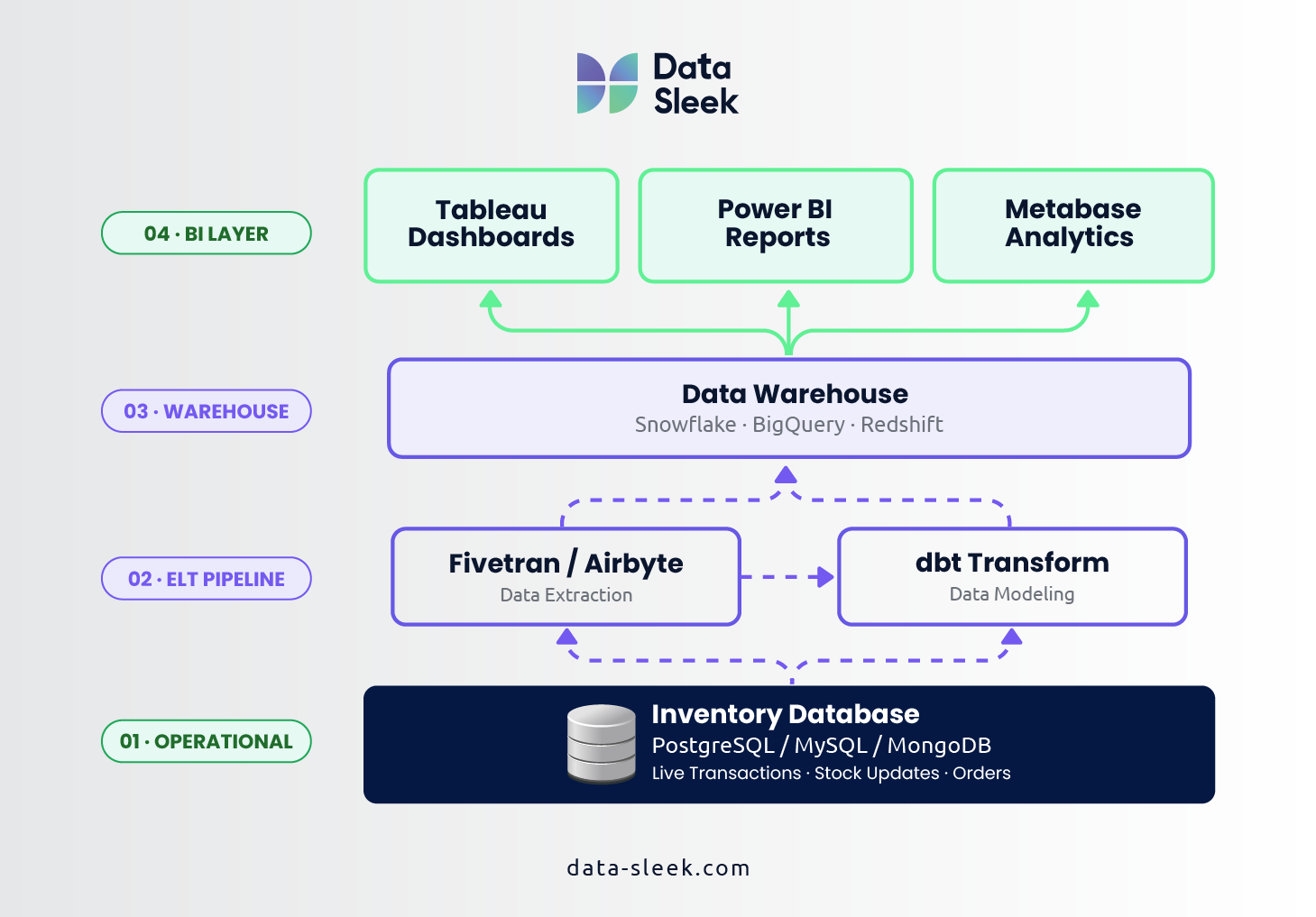
This is when it’s time to add a dedicated analytics layer. The concept is straightforward: replicate your inventory data into a system designed for analytical workloads, and run your reports there instead of against your operational database.
- Data warehouse solutions like Snowflake, BigQuery, or Amazon Redshift are built for exactly this. They can handle the complex queries that would grind a transactional database to a halt.
- ELT pipelines (tools like Fivetran for extraction, dbt for transformation) automate the process of moving data from your inventory system into the warehouse and structuring it for analysis.
- Business intelligence tools like Tableau or Power BI sit on top of the warehouse and let your team build dashboards and reports without writing SQL.
This isn’t just for enterprise companies. Mid-market businesses with 5,000+ SKUs often see immediate value from separating their analytical workloads. Demand forecasting, supplier performance tracking, and margin analysis become practical when you have the right data infrastructure. Our data analytics consulting services help businesses design exactly this kind of setup.
Common Mistakes When Choosing an Inventory Database
After years of helping businesses with database architecture, we’ve seen the same mistakes come up again and again. Here’s what to watch for.
Choosing based on popularity instead of fit. PostgreSQL or MySQL are our general recommendation, but it’s not always the right answer. A business already deep in the Microsoft ecosystem may be better served by SQL Server. A tiny operation with 100 SKUs doesn’t need PostgreSQL’s power. Match the database to your actual requirements, not what’s trending on tech blogs.
Ignoring data access from day one. This is the mistake with the highest long-term cost. You choose software because the features look great, only to discover six months later that you can’t get your data out for the custom reports your CFO needs. Always evaluate data accessibility before signing a contract.
Underestimating growth. The database that works perfectly for 1,000 SKUs and 50 orders per day may struggle at 10,000 SKUs and 500 orders. Plan for where your business will be in three years, not where it is today. It’s far cheaper to architect for growth upfront than to migrate under pressure later.
Skipping the analytics conversation. Many businesses add an analytics layer as an afterthought, after realizing they can’t get the insights they need from their operational database. Thinking about analytics requirements during the initial database selection saves time and money. Even if you don’t build the warehouse layer immediately, choosing a database that integrates well with common data pipeline tools keeps that door open.
Not planning for migration. Business needs change. The commercial platform that’s perfect today might not be the right fit in three years. Choose systems that let you export your data completely—transaction history, product data, supplier records, everything—in standard formats. Your future self will thank you.
How Data-Sleek Helps Businesses Get Inventory Architecture Right
We’re not an inventory management software company. We’re database architects and data consultants who help businesses make smart infrastructure decisions—including choosing, building, and optimizing the database layer that inventory systems depend on.
Our clients come to us at different stages. Some are outgrowing spreadsheets and need help designing their first real inventory database. Others have commercial software that’s hit a wall and need to architect a data pipeline to get their inventory data into an analytics platform. Some are building custom systems from scratch and need expert guidance on schema design, database selection, and scalability planning.
We’ve helped ecommerce companies like Sqquid solve inventory data scaling challenges, multi-location retailers like Hyperwolf get real-time visibility across locations, and manufacturing operations achieve the kind of data-driven inventory control that reduces costs and improves fulfillment rates.
If you’re evaluating database options for inventory management—whether you’re building something new, replacing an old system, or trying to get more out of what you have—we can help. Our database consulting services start with a free consultation to understand your situation and recommend the right path forward. No sales pitch, no obligation—just honest guidance from people who’ve done this hundreds of times.
Ready to get your inventory data architecture right?
Book a Free Consultation with a Data-Sleek Database Architect →
Frequently Asked Questions
What is the best database for a small inventory system?
For businesses with under 500 SKUs and straightforward needs, MySQL is the easiest starting point. It’s simple to set up, widely supported by commercial inventory tools, and affordable to host. If you anticipate growth, PostgreSQL offers more headroom for the future without being significantly more complex to get started with.
Should I build a custom inventory database or buy software?
It depends on how unique your inventory processes are. If your workflows fit the standard mold—receiving, storing, picking, shipping—commercial or open-source software will save you time and money. If you have industry-specific requirements, complex multi-location logic, or need deep integration with proprietary systems, a custom database design may be worth the investment. Open-source platforms like Odoo offer a middle ground: a working system you can customize.
Can I use Excel as an inventory database?
You can, but only up to a point. Excel works for very small operations—a few hundred products, one person updating it. Once you have multiple people managing inventory, multiple locations, or need real-time accuracy, Excel becomes a liability. Data gets overwritten, formulas break, and there’s no transaction logging. Moving to a real database is one of the highest-impact upgrades a growing business can make.
What does “data access” mean when evaluating inventory software?
Data access refers to how easily you can get your raw data out of the system. Full data access means you can connect to the underlying database with SQL queries, export complete datasets, and replicate data to other systems like analytics warehouses. Limited data access means you’re restricted to the vendor’s own reporting tools or API, which may not support the reports or analysis you need. This matters most as your business grows and your questions outpace the software’s built-in capabilities.
When should I add a data warehouse for inventory analytics?
When your operational reports start slowing down, when you need cross-system analysis (inventory + sales + marketing), or when your team is spending hours manually compiling data that should be automated. For most mid-market businesses, this inflection point comes somewhere around 5,000 active SKUs or when inventory decisions directly impact margin. Our data warehouse consulting team can help you determine the right timing.


